
iMac repairs, service and support
Over twenty years repairing, servicing and supporting iMacs across Perth — from the older Intel machines through to the Retina models and Apple silicon.

Slow iMac? The SSD upgrade is the fix
If your iMac has turned sluggish, it's time to consider an SSD. They're far faster and far more reliable than the spinning hard drives these machines shipped with, and nothing else you can do to an iMac makes anything like the same difference.
Prices have come down a long way too. And if the existing drive has already failed or become unreliable, replacing it with an SSD is the obvious choice rather than putting another mechanical drive back in.
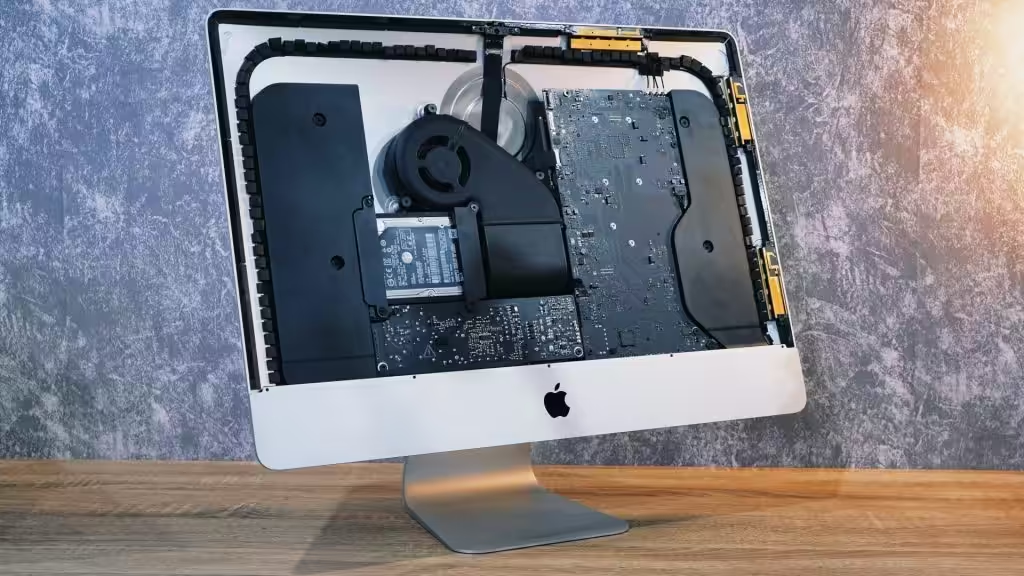
Why the Retina iMac is hard to work on
The modern Retina iMac is a genuinely difficult machine to open. To reach the logic board, the drives and the RAM you have to cut away the double-sided tape holding the display glass to the aluminium frame — and that glass is fragile. It is not a job to attempt with a kitchen knife.
Once inside, these Macs use Fusion Drive technology, which splits the boot and data volumes across two drives. The boot volume is a small SSD. It's prone to failure, and it's essential if you want to recover anything off the machine.
A failing Fusion Drive boot volume gets worse every time the iMac is powered on. The earlier it comes in, the more we can get back.
Try these first
Five things worth doing before you bring an iMac in. If one of them fixes it, you've saved yourself a call-out — and if none of them do, you'll have told me something useful.
Call 0405 119 483Reset the SMC
The system management controller handles power, fans and sleep. Resetting it clears a surprising number of odd behaviours.
Reset the NVRAM or PRAM
This is where the Mac keeps display, sound and startup-disk settings. Worth clearing if the machine starts to the wrong place or the screen looks wrong.
Reboot in Safe Mode
Safe Mode loads only what macOS needs. If the iMac behaves in Safe Mode but not otherwise, the fault is software, not hardware.
Look for high CPU usage in Activity Monitor
Sort by CPU and watch for a process sitting at the top. One misbehaving app explains a lot of "my Mac is slow" calls.
Boot to Recovery and run First Aid
A file system check from Recovery mode will find and often repair directory damage on the startup disk.
iMac faults we fix
Pick whichever sounds like your machine. If none of them do, call and describe it.
Boots to a folder with a question mark
The iMac can't find a system to start from.
What this means →iMac won't turn on
No chime, no light, no picture when you press the button.
What to check →Spinning wheel of death
The beachball never stops and nothing responds.
What this means →SSD repair and upgrade
The single biggest speed improvement an older iMac can get.
SSD upgrades →Fusion Drive problems
The small boot SSD fails and takes the whole volume with it.
Fusion Drives →Power supply repairs
Shutting off under load, or dead with no sign of life at all.
Power supply →Kernel panic
The screen dims and tells you to restart, over and over.
What this means →Install macOS
A clean system installed properly, with your data brought across.
macOS installs →Update the iMac OS
Moving an older iMac up to a supported version of macOS safely.
OS updates →Damaged keyboard or mouse
Replaced or repaired, wired or wireless.
Memory upgrade
More RAM where the model allows it — often alongside an SSD.
What iMac repairs cost
Free diagnosis, then a fixed price before any work starts. Nothing goes ahead until you say so.
All prices include GST. Opening a Retina iMac means new display tape every time, and that's included above. Apple parts are quoted separately and shown to you before anything is ordered. Figures shown are indicative starting prices, pending Digby's confirmation.
Other things we fix

All Apple Mac repairs
- iMac, MacBook and Mac mini
- Hard drive and SSD replacement
- Damaged screens

MacBook repairs
- Screen and battery repair
- Logic board repairs
- Trackpad repairs

Computer repairs
- Slow computer and laptop repairs
- Broken screen replacements
- CMOS battery replacement

PC repairs
- Windows update problems
- Network and print issues
- Windows not booting properly

Computer technician
- Update software packages
- Diagnose and resolve IT issues
- Email setup
Tell me what your iMac is doing
Describe it and I'll tell you the likely cause and roughly what it costs — before you commit to anything.